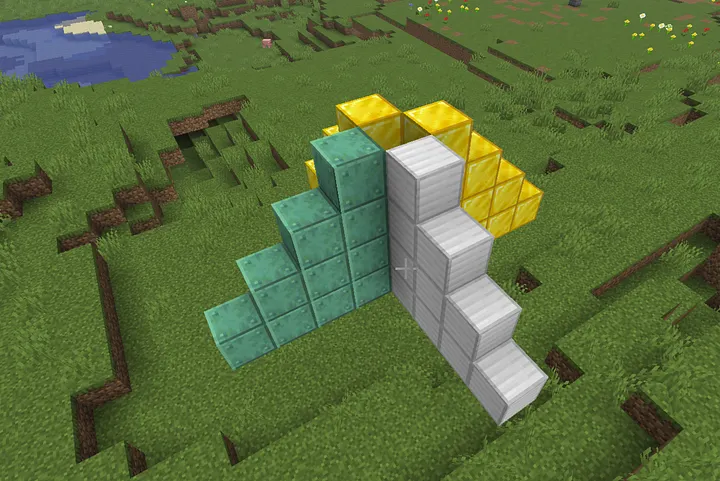
Constructing Right-Triangle Block Structures in Minecraft with Terraform
I’ve been adding a few more modules to the Minecraft Primitives Terraform module library — a fun side project of mine.
module "golden_triangle" {
  source  = "markti/primitives/minecraft/modules/triangle"
  version = "1.0.7"

  material  = "gold_block"
  direction = "east"
  height    = 7
  width     = 7

  start_position = {
    x = 557
    y = 83
    z = 312
  }
}
This Terraform module generates right-angled triangle block patterns in a Minecraft world, using the markti/minecraftprovider. The triangle is defined by its base width and height, and can be oriented across different planes (xz, xy, or yz) and directions (north, south, east, west).
The configuration is designed to be modular, readable, and expressive — enabling developers or map designers to define triangle shapes programmatically, with options for transformation and precise block placement.
Transforming the Start Position
The module begins by transforming the user-defined start_position with a translation vector. This allows for flexibility in repositioning the triangle relative to a base point:
module "transformed_start_position" {
  source = "../position"
  start_position   = var.start_position
  translate_vector = var.transform
}
The result of this transformation becomes the logical origin (local.origin) for subsequent block calculations.
Defining Axes Based on Plane and Direction
To draw the triangle, two orthogonal axes are required: one for the base (width leg, u) and another for the height (vertical leg, v). These are determined based on the selected plane and direction, allowing dynamic orientation of the triangle in 3D space:
local.axes_by_plane_and_direction = {
  # Definitions for xz, xy, and yz planes...
}
The u and v vectors are selected based on the combination of var.plane and var.direction, supporting the triangle’s correct alignment regardless of world orientation. Calculating Row Widths
To form a triangular shape, each row’s length must shrink linearly from the base width down to 1 block at the apex. This is calculated as follows:
row_widths = [
  for r in range(0, var.height) : (
    var.height == 1
    ? var.width
    : (var.width - floor((r * (var.width - 1)) / (var.height - 1)))
  )
]
The result is a row_widths list, where each entry corresponds to the number of blocks in that row, beginning from the widest row (r = 0) down to the narrowest.
Generating Row Specifications
Each row is defined by its starting position and its length along the u axis. These rows are derived from the triangle’s origin by stepping r units along the v vector:
rowspecs = [
  for r in range(0, var.height) : {
    r      = r
    length = local.row_widths[r]
    start = {
      x = local.origin.x + local.v.x * r
      y = local.origin.y + local.v.y * r
      z = local.origin.z + local.v.z * r
    }
  }
]
This approach enables the use of the vector module to draw each row individually.
The rows are also mapped by index into a dictionary (rowspecs_by_key) for easy for_each usage in the module block.
Drawing Rows as Vectors
Each triangle row is emitted using the vector module. Each row starts at its computed position and extends along the udirection:
module "rows" {
  source = "../vector"
  for_each = local.rowspecs_by_key
  material       = var.material
  length         = each.value.length
  direction      = local.row_dir
  start_position = each.value.start
  transform = {
    x = 0
    y = 0
    z = 0
  }
}
The row_dir is computed by mapping the u vector to a string direction:
u_to_dir = {
  "1,0,0"  = "east"
  "-1,0,0" = "west"
  "0,1,0"  = "up"
  "0,-1,0" = "down"
  "0,0,1"  = "south"
  "0,0,-1" = "north"
}
Calculating Key Points and Midpoints
To support debugging or geometric reasoning, the module computes several key coordinates:
- A: The right-angle vertex (origin).
- B: End of the base leg (u-direction).
- C: End of the height leg (v-direction).
- AB, AC, BC: Midpoints between each pair.
These are calculated using basic vector arithmetic and integer rounding (floor), ensuring alignment with Minecraft’s block grid:
B = {
  x = local.origin.x + local.u.x * (var.width - 1)
  ...
}
Optional Debugging: Block List and Count
To support inspection or advanced visualization, the configuration also flattens the 2D triangle layout into a full list of individual block coordinates:
blocks = flatten([
  for r in range(0, var.height) : [
    for c in range(0, local.row_widths[r]) : {
      x = local.origin.x + local.u.x * c + local.v.x * r
      y = local.origin.y + local.u.y * c + local.v.y * r
      z = local.origin.z + local.u.z * c + local.v.z * r
    }
  ]
])
The total number of blocks used is also computed via sum(local.row_widths).
Outputs
This module exposes several outputs for use in downstream modules or debugging:
- origin: The triangle’s base coordinate (after transformation).
- block_count: Total number of blocks used.
- blocks: List of all block coordinates.
- rows: The full set of row specifications (start, length, row index).
- points: The triangle’s corner points and midpoints, both individually and grouped under points.all.
Inputs and Validation
The module parameters ensure flexible, safe configuration. Notable inputs include:
- material: The block type.
- start_position: The right-angle corner coordinate.
- width and height: Triangle dimensions, with integer constraints.
- plane and direction: Orientation settings, validated against known options.
- transform: Optional translation applied to start_position.
variable "width" {
  type = number
  validation {
    condition     = var.width >= 1 && floor(var.width) == var.width
    error_message = "width must be an integer >= 1."
  }
}
Conclusion
This Terraform configuration provides a clear, parameterized way to render triangular structures in Minecraft using vector logic. By decomposing the problem into geometric transformations, orthogonal vector pairs, and incremental row generation, it creates a flexible and reusable approach for building sloped or patterned shapes. The modularity of the vector module and the structured local logic allow for sophisticated shape creation with minimal manual effort.
I’m looking forward to building other more complex shapes that use the Triangle module as an accelerant.