Building the HubSpot Collector
The previous article covered the shape of the HubSpot API: six engagement types rather than one, associations as separate calls, stage definitions that have to be resolved rather than hardcoded, and a definition of “week” that had to be reconciled against a hand-built report before I trusted it.
This article is the collector. It follows the same skeleton as the cost collector and I am not going to repeat the parts that are identical. What is different here is that there are four tables instead of one, two of them hold state and two hold events, and there is a secret involved.
Step 1: Four tables, because there are two shapes of data
The cost collector had one table. This one has four, and the split is along the state-versus-events line from the first article in the series.
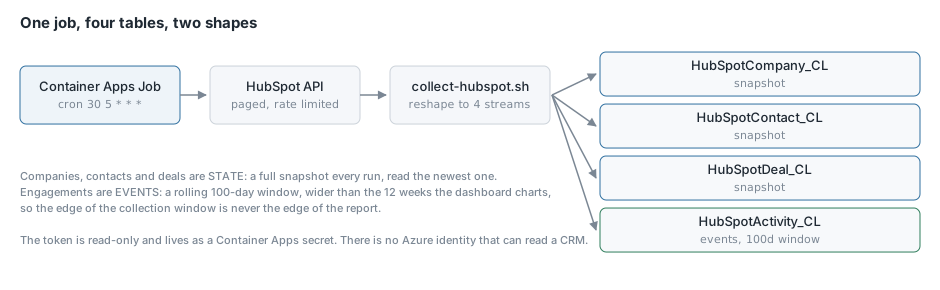
HubSpotCompany_CL and HubSpotContact_CL and HubSpotDeal_CL are state. “How many deals are in Discovery” is a question about right now, and the answer changes without anything emitting an event. So the job writes a full snapshot of each on every run, tagged with the snapshot date, and the dashboard reads the newest one.
The side effect is pipeline history the CRM does not keep. HubSpot will not tell you what your funnel looked like six weeks ago. After six weeks of snapshots, you can.
HubSpotActivity_CL is events. A note logged on Tuesday is a fact that never changes. Those accumulate, and the collection is windowed so each run re-reads a rolling period rather than the whole history.
The window is a hundred days, which is deliberately wider than the twelve weeks the dashboard charts. If the collection window and the reporting window are the same, the oldest week on your chart is always half-collected. Making the collection wider than the report means the edge of the window is never the edge of the chart.
Declaring four schemas got repetitive enough that I moved to a map and let the DCR iterate:
locals {
  streams = {
    deal     = { stream = local.deal_stream_name,     columns = local.deal_columns }
    activity = { stream = local.activity_stream_name, columns = local.activity_columns }
    company  = { stream = local.company_stream_name,  columns = local.company_columns }
    contact  = { stream = local.contact_stream_name,  columns = local.contact_columns }
  }
}

resource "azurerm_monitor_data_collection_rule" "crm" {
  ...
  dynamic "stream_declaration" {
    for_each = local.streams
    content {
      stream_name = stream_declaration.value.stream
      dynamic "column" {
        for_each = stream_declaration.value.columns
        content {
          name = column.value.name
          type = column.value.type
        }
      }
    }
  }

  dynamic "data_flow" {
    for_each = local.streams
    content {
      streams       = [data_flow.value.stream]
      destinations  = ["shared"]
      output_stream = data_flow.value.stream
      transform_kql = "source"
    }
  }
}
One DCR with four streams rather than four DCRs. The identity grant, the endpoint and the failure modes are all per-rule, so a second rule would double the moving parts to carry a table that arrives from the same job in the same run.
Step 2: The secret
The cost collector needed no secret, because a managed identity can read Azure’s own cost data. There is no Azure identity that can read a CRM, so this one needs a token.
It lives as a Container Apps secret:
secret {
  name  = "hubspot-token"
  value = var.hubspot_token
}

template {
  container {
    env {
      name        = "HUBSPOT_TOKEN"
      secret_name = "hubspot-token"
    }
  }
}
Referencing it as secret_name rather than value keeps it out of the job’s environment listing and out of az containerapp job show.
The variable is marked sensitive and lives in a gitignored secrets.auto.tfvars, which Terraform auto-loads:
variable "hubspot_token" {
  type      = string
  sensitive = true
}
I want to be straight about the trade here rather than pretend it is airtight. The token lands in Terraform state. The state account’s access controls are what protect it. I considered Key Vault and decided against it for one string, because it adds a resource, a data source, an access policy and a failure mode, and the state file is already the thing you must protect. If your state storage is not already locked down, fix that first and this decision changes.
Step 3: Paginate to files, not into a variable
The cost API returned everything in one response. HubSpot pages at a hundred, so almost every call is a loop.
The obvious way to accumulate pages is a shell variable:
# don't do this
all=$(jq -n --argjson a "$all" --argjson r "$page" '$a + $r')
That works until it does not. --argjson puts the accumulated JSON on the argv, and Linux caps a single argv entry at 128 KB. Once you have a few thousand records the job dies with “Argument list too long”, which looks like a jq bug and is not.
Pages go to files and get slurped at the end:
search_all() {
  local object="$1" body="$2" out="$3" after="" page results n=0
  local dir="${WORK}/pages_${object}"
  rm -rf "$dir" && mkdir -p "$dir"
  while :; do
    if [[ -n "$after" ]]; then
      page=$(echo "$body" | jq --arg a "$after" '. + {after: $a}')
    else
      page="$body"
    fi
    results=$(curl -s -X POST "${HS}/crm/v3/objects/${object}/search" \
      -H "$AUTH" -H "Content-Type: application/json" --data "$page")
    if ! echo "$results" | jq -e '.results' >/dev/null 2>&1; then
      echo "    ERROR: HubSpot ${object} search failed: $(echo "$results" | jq -c '.message // .')" >&2
      exit 1
    fi
    n=$((n + 1))
    echo "$results" | jq '.results' > "${dir}/page_$(printf '%04d' "$n").json"
    after=$(echo "$results" | jq -r '.paging.next.after // empty')
    [[ -z "$after" ]] && break
    sleep 0.3
  done
  jq -s 'add' "${dir}"/page_*.json > "$out"
}
The sleep 0.3 between pages is not decoration. HubSpot search is rate limited at a few requests a second, and a portal that has grown will hit it.
The same argv limit applies to curl --data-binary "$CHUNK" on the way out, which is the bug I described in the cost collector article. Both directions go through files.
Step 4: Resolve labels at collection time
Owner names and stage labels are resolved once, up front, and denormalised onto every row:
OWNERS=$(curl -s "${HS}/crm/v3/owners?limit=100" -H "$AUTH" \
  | jq '[.results[] | {key: .id, value: {
        name: ((.firstName // "") + " " + (.lastName // "") | gsub("^\\s+|\\s+$";"")),
        email: (.email // "")}}] | from_entries')
Then every lookup guards against a missing key:
($owners[$p.hubspot_owner_id // ""] // {}) as $o
The inner // "" is not optional. Indexing a jq object with null is a hard error, not a miss, and an engagement logged by a workflow rather than a person genuinely has no owner. Without the guard the run dies on the first automated record.
Step 5: Snapshots and windows in the same script
The deals section is unwindowed. Every open deal is written every run, however old:
search_all deals '{"limit":100,"properties":["dealname","dealstage","pipeline","amount",
  "hubspot_owner_id","createdate","closedate","notes_last_updated","notes_last_contacted",
  "hs_v2_date_entered_current_stage"]}' "${WORK}/deals.json"
The engagement section is windowed by created date:
SINCE_MS=$(( $(date -u -d "-${LOOKBACK_DAYS} days" '+%s') * 1000 ))

BODY=$(jq -n --arg since "$SINCE_MS" '{
  limit: 100,
  properties: ["hs_timestamp","hs_createdate","hubspot_owner_id","hs_task_status",
               "hs_email_direction"],
  filterGroups: [{filters: [{propertyName: "hs_createdate", operator: "GTE", value: $since}]}],
  sorts: [{propertyName: "hs_createdate", direction: "DESCENDING"}]
}')
HubSpot wants epoch milliseconds in that filter, not an ISO date.
A few properties in there are worth calling out because they carry more weight than their size suggests.
hs_v2_date_entered_current_stage is HubSpot’s own record of when a deal last moved stage. Without it you can tell how long a deal has been quiet but not how long it has been stuck, and those are different failures. Taking HubSpot’s value rather than deriving it from snapshot history also means time-in-stage is correct on day one rather than after a month of collection.
hs_task_status is only meaningful on tasks. Asking for it on every object type is harmless and keeps one request shape rather than six. Without it a completed task and one rotting in the queue are indistinguishable.
hs_email_direction is what makes follow-up time mean anything. Without direction, a customer replying to us scores as us following up, and the metric measures the opposite of what it claims.
One field I expected to use and could not: hs_last_sales_activity_timestamp is the obvious candidate for deal staleness and it is empty on every deal in our portal. notes_last_updated is the one that is actually populated, and despite the name it covers calls, emails and meetings too. Check which of the plausible fields your portal actually fills in before you build on one.
Step 6: Associations, in batches, to files
For each engagement type, three association lookups: to deals, to companies, to contacts.
assoc_map() {
  local from="$1" to="$2" idsfile="$3" out="$4" resp b=0
  local dir="${WORK}/assoc_${from}_${to}"
  rm -rf "$dir" && mkdir -p "$dir"
  echo '{}' > "${dir}/b0000.json"
  while read -r IDS; do
    b=$((b + 1))
    resp=$(curl -s -X POST "${HS}/crm/v4/associations/${from}/${to}/batch/read" \
      -H "$AUTH" -H "Content-Type: application/json" \
      --data "$(jq -n --argjson ids "$IDS" '{inputs: [$ids[] | {id: .}]}')")
    echo "$resp" | jq '[.results // [] | .[]
        | select((.to // []) | length > 0)
        | {key: .from.id, value: (.to[0].toObjectId | tostring)}] | from_entries' \
      > "${dir}/b$(printf '%04d' "$b").json"
    sleep 0.2
  done < <(jq -c '_nwise(100)' "$idsfile")
  jq -s 'add' "${dir}"/b*.json > "$out"
}
Note .results // []. This endpoint returns 207 when some inputs have no association, and reading .results defensively means the 207 needs no special handling at all. The empty seed file at b0000.json means the final jq -s 'add' has something to add even when every batch came back empty.
Step 7: The job
Same shape as the cost job. Cron is 30 5 * * *, half an hour before the cost job so the two are not competing for the same ingestion endpoint.
resource "azurerm_container_app_job" "crm" {
  name                         = "caj-<project>-salesops-crm-<region>"
  replica_timeout_in_seconds   = 1800
  replica_retry_limit          = 2
  ...
  env { name = "DEAL_STREAM_NAME"     value = local.deal_stream_name }
  env { name = "ACTIVITY_STREAM_NAME" value = local.activity_stream_name }
  env { name = "COMPANY_STREAM_NAME"  value = local.company_stream_name }
  env { name = "CONTACT_STREAM_NAME"  value = local.contact_stream_name }
  env { name = "LOOKBACK_DAYS"        value = tostring(var.lookback_days) }
}
A full run reads a few hundred records across four object types and six engagement endpoints, and takes a couple of minutes.
What a run looks like
--> Fetching owners
    3 owners
--> Fetching deal pipelines and stages
    20 stages across all pipelines
--> Fetching companies (full snapshot, no window)
    180 companies
--> Fetching contacts (full snapshot, no window)
    300 contacts
--> Fetching deals (full snapshot, no window)
    ...
--> Fetching engagements created since 2026-05-28
    notes: ...
    meetings: ...
    emails: ...
    tasks: ...
    ingested 180 rows into Custom-HubSpotCompany_CL
    ingested 300 rows into Custom-HubSpotContact_CL
    ingested ... rows into Custom-HubSpotDeal_CL
    ingested ... rows into Custom-HubSpotActivity_CL
That ordering, with companies ingesting before the others, is how I found the argv bug. Companies went in fine and contacts failed, because contact rows are wider and crossed 128 KB where companies had not.
Conclusion
Four tables, one job, and most of the code is dealing with the shape of the source rather than with moving data. The parts I would concentrate on if you are building something similar are the ones that are silent when they go wrong: guarding every map lookup because jq treats a null index as fatal, coercing empty strings before they reach tonumber, and reading .results defensively so a 207 needs no special case.
The one design decision I would defend hardest is making the collection window wider than the reporting window. It costs nothing and it means the oldest bar on your chart is a real number rather than a partially collected one. The next article is the query layer, where the dashboard’s vocabulary gets defined and where I discovered that my first definition of “needs attention” was surfacing a list of accounts, which is a list nobody works.