Building the Azure Cost Collector
The previous article covered why Azure cost data is awkward: it gets revised after the fact, the tag grouping comes back in an inconsistent shape, and a partial read produces a number that looks fine and is wrong. This article is the thing that deals with all of that, end to end. The Terraform that creates the infrastructure, and the shell script that does the work.
I am going to go through it in the order you would build it, and at the end you should be able to reproduce the whole layer. It is about two hundred lines of Terraform and a hundred and seventy of bash, and the interesting parts are all in the last third of each.
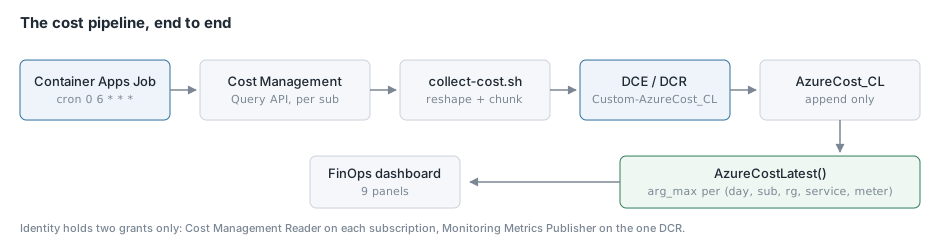
Step 1: Find the workspace rather than wiring it through state
The collector writes into a Log Analytics workspace that another Terraform layer owns. There are two ways to reference that and I have come to prefer the boring one.
data "azurerm_log_analytics_workspace" "shared" {
  name                = var.workspace_name
  resource_group_name = var.workspace_resource_group_name
}

data "azurerm_monitor_data_collection_endpoint" "shared" {
  name                = var.data_collection_endpoint_name
  resource_group_name = var.workspace_resource_group_name
}
A terraform_remote_state data source would be the more sophisticated answer and it would couple this layer to the internals of another one. Looking things up by name means the only contract between the layers is the name, which is stable, and it is the convention the rest of our platform already follows.
Step 2: The identity, and only two grants
resource "azurerm_user_assigned_identity" "job" {
  name                = "id-<project>-finops-<region>"
  resource_group_name = azurerm_resource_group.finops.name
  location            = azurerm_resource_group.finops.location
}

resource "azurerm_role_assignment" "cost_reader" {
  for_each             = var.cost_subscription_ids
  scope                = "/subscriptions/${each.value}"
  role_definition_name = "Cost Management Reader"
  principal_id         = azurerm_user_assigned_identity.job.principal_id
  principal_type       = "ServicePrincipal"
}

resource "azurerm_role_assignment" "metrics_publisher" {
  scope                = azurerm_monitor_data_collection_rule.cost.id
  role_definition_name = "Monitoring Metrics Publisher"
  principal_id         = azurerm_user_assigned_identity.job.principal_id
  principal_type       = "ServicePrincipal"
}
User-assigned rather than system-assigned, for the reason in the first article: its role assignments span eight subscriptions and a DCR, and a system-assigned identity is destroyed and recreated along with its parent, which would orphan every one of those grants the first time the job is replaced.
Note that the cost reader grants are a single for_each over a map of subscriptions rather than one aliased provider per subscription. azurerm_role_assignment takes an absolute scope, so the default provider can grant into any subscription the credentials can reach. That is the difference between adding a subscription being one line in a tfvars file and being a new provider block.
Step 3: The custom table
There is no azurerm resource that creates a Log Analytics custom table. azurerm_log_analytics_workspace_table only adjusts retention and plan on tables that already exist. Creating one means the Tables ARM API through azapi:
resource "azapi_resource" "cost_table" {
  type      = "Microsoft.OperationalInsights/workspaces/tables@2022-10-01"
  name      = "AzureCost_CL"
  parent_id = data.azurerm_log_analytics_workspace.shared.id

  body = {
    properties = {
      retentionInDays      = var.table_retention_days
      totalRetentionInDays = var.table_retention_days
      schema = {
        name = "AzureCost_CL"
        columns = [
          { name = "TimeGenerated",    type = "datetime" },
          { name = "CostDate",         type = "datetime" },
          { name = "SubscriptionId",   type = "string" },
          { name = "SubscriptionName", type = "string" },
          { name = "ResourceGroup",    type = "string" },
          { name = "ServiceName",      type = "string" },
          { name = "MeterCategory",    type = "string" },
          { name = "Environment",      type = "string" },
          { name = "Cost",             type = "real" },
          { name = "Currency",         type = "string" },
        ]
      }
    }
  }
}
The table name has to end in _CL. Retention is set to -1, which inherits the workspace default rather than pinning a second number that would silently diverge if the workspace one changed.
One quirk to expect: Azure stores -1 and reports back the resolved value, so every subsequent plan shows a diff of 730 -> -1 on this resource forever. It is a no-op. The response includes retentionInDaysAsDefault: true, which is how you confirm it really is inheriting. I spent a few minutes worrying about it the first time.
Step 4: The data collection rule
The DCR declares a stream with a schema and a data flow saying where rows on that stream land.
resource "azurerm_monitor_data_collection_rule" "cost" {
  name                        = "dcr-<project>-finops-<region>"
  resource_group_name         = azurerm_resource_group.finops.name
  location                    = azurerm_resource_group.finops.location
  data_collection_endpoint_id = data.azurerm_monitor_data_collection_endpoint.shared.id

  destinations {
    log_analytics {
      workspace_resource_id = data.azurerm_log_analytics_workspace.shared.id
      name                  = "shared"
    }
  }

  stream_declaration {
    stream_name = "Custom-AzureCost_CL"
    dynamic "column" {
      for_each = local.cost_columns
      content {
        name = column.value.name
        type = column.value.type
      }
    }
  }

  data_flow {
    streams       = ["Custom-AzureCost_CL"]
    destinations  = ["shared"]
    output_stream = "Custom-AzureCost_CL"
    transform_kql = "source"
  }

  depends_on = [azapi_resource.cost_table]
}
The stream name is the table name with a Custom- prefix. transform_kql = "source" means pass rows through unchanged, which is what you want when the collector has already shaped them.
The column list is declared once as a local and used by both the table and the stream, because the two have to agree exactly and the way that goes wrong is somebody adding a column in one place.
The depends_on is not decoration. The DCR references a table that has to exist first.
Step 5: The job
resource "azurerm_container_app_environment" "finops" {
  name                       = "cae-<project>-finops-<region>"
  log_analytics_workspace_id = data.azurerm_log_analytics_workspace.shared.id
  logs_destination           = "log-analytics"
}

resource "azurerm_container_app_job" "cost" {
  name                         = "caj-<project>-finops-cost-<region>"
  container_app_environment_id = azurerm_container_app_environment.finops.id

  replica_timeout_in_seconds = 1800
  replica_retry_limit        = 2

  schedule_trigger_config {
    cron_expression          = var.cron_expression
    parallelism              = 1
    replica_completion_count = 1
  }

  identity {
    type         = "UserAssigned"
    identity_ids = [azurerm_user_assigned_identity.job.id]
  }

  template {
    container {
      name    = "collect-cost"
      image   = "mcr.microsoft.com/azure-cli:latest"
      cpu     = 0.5
      memory  = "1Gi"
      command = ["/bin/bash", "-c"]
      args    = [file("${path.module}/scripts/collect-cost.sh")]

      env { name = "AZURE_CLIENT_ID"  value = azurerm_user_assigned_identity.job.client_id }
      env { name = "SUBSCRIPTION_IDS" value = join(" ", values(var.cost_subscription_ids)) }
      env { name = "DCE_ENDPOINT"     value = data.azurerm_monitor_data_collection_endpoint.shared.logs_ingestion_endpoint }
      env { name = "DCR_IMMUTABLE_ID" value = azurerm_monitor_data_collection_rule.cost.immutable_id }
      env { name = "STREAM_NAME"      value = local.stream_name }
      env { name = "LOOKBACK_DAYS"    value = tostring(var.lookback_days) }
    }
  }

  depends_on = [
    azurerm_role_assignment.cost_reader,
    azurerm_role_assignment.metrics_publisher,
  ]
}
Cron is 0 6 * * *, daily at six in the morning UTC. Cost data lags between eight and twenty-four hours, so running more often buys nothing.
logs_destination = "log-analytics" on the environment is the line I called out in the first article. Without it your job’s console output goes nowhere.
The depends_on at the bottom prevents a race that produces a very confusing error. Without it the first scheduled run can fire before the role assignments exist and fail with a 403, which looks like a code bug rather than an ordering problem.
The timeout is thirty minutes with two retries. A run that hangs on a throttled API should fail and let tomorrow’s run re-read the same window rather than holding a slot.
Step 6: The collector script
The script is passed to the stock azure-cli image as an argument. It has four phases.
Authenticate, twice. ARM and the ingestion endpoint are different audiences.
az login --identity --client-id "$AZURE_CLIENT_ID" --only-show-errors >/dev/null

INGEST_TOKEN=$(az account get-access-token \
  --resource "https://monitor.azure.com" --query accessToken -o tsv)
Query each subscription, with backoff. The Cost Management query body is the one from the previous article. Eight subscriptions in a loop against an aggressively rate limited API means 429s are routine:
for ATTEMPT in 1 2 3 4 5; do
  if RESPONSE=$(az rest --method post \
    --url "https://management.azure.com/subscriptions/${SUB}/providers/Microsoft.CostManagement/query?api-version=2023-11-01" \
    --headers "Content-Type=application/json" \
    --body "$QUERY" --only-show-errors 2>/tmp/cm.err); then
    break
  fi
  if grep -q "429\|Too many requests" /tmp/cm.err; then
    BACKOFF=$((ATTEMPT * 20))
    echo "    throttled (attempt ${ATTEMPT}/5), sleeping ${BACKOFF}s"
    sleep "$BACKOFF"
    RESPONSE=""
  else
    echo "    ERROR querying ${SUB}: $(cat /tmp/cm.err)" >&2
    RESPONSE=""
    break
  fi
done
Linear backoff, twenty seconds times the attempt number. There is also a sleep 5 between subscriptions, because the next iteration is another query against the same throttled API.
Reshape. Zip the column names onto the positional rows, address by name, and produce objects matching the stream schema. The tag handling from the previous article lives here.
Ingest, in chunks, from a file.
while read -r CHUNK; do
  N=$(echo "$CHUNK" | jq 'length')
  HTTP=$(curl -s -o /tmp/ingest.out -w '%{http_code}' -X POST \
    "${DCE_ENDPOINT}/dataCollectionRules/${DCR_IMMUTABLE_ID}/streams/${STREAM_NAME}?api-version=2023-01-01" \
    -H "Authorization: Bearer ${INGEST_TOKEN}" \
    -H "Content-Type: application/json" \
    --data-binary "$CHUNK")
  if [[ "$HTTP" != "204" && "$HTTP" != "200" ]]; then
    echo "    ERROR: ingestion returned ${HTTP}: $(cat /tmp/ingest.out)" >&2
    exit 1
  fi
  TOTAL=$((TOTAL + N))
done < <(echo "$PAYLOAD" | jq -c '_nwise(500)')
Chunks of five hundred rows, because the ingestion API caps a request at one megabyte and a month with a lot of resource groups will exceed it.
The version above is the one that shipped first and it has a latent bug that I did not hit here and did hit later, on a collector with wider rows. --data-binary "$CHUNK" puts the entire payload on the argv, and Linux caps a single argv entry at 128 KB, well below the megabyte the API accepts. Once a chunk of wide rows crosses that line the job dies with “Argument list too long”, which reads like a jq failure. Write the chunk to a file and pass @file:
printf '%s' "$CHUNK" > "${WORK}/chunk.json"
curl ... --data-binary "@${WORK}/chunk.json"
It does not reproduce on macOS, which is why it survived local testing.
Step 7: A provision script, including the unlock
Every layer in our platform has a provision.sh that handles backend init and the apply. The cost layer has an extra action on it that I want to mention because the first time I needed it I did the wrong thing for twenty minutes.
An interrupted apply leaves the state blob leased, and every subsequent plan fails with “Error acquiring the state lock”. The obvious response is terraform force-unlock <id> in that directory. It does not work, because our backend block is empty and the real settings live in a separate file:
terraform {
  backend "azurerm" {}
}
Without an init that passes -backend-config, Terraform has no backend to unlock and exits before touching anything. The failure is quiet enough to miss. So the script has an unlock action that inits the backend the same way the other actions do, reads the lock id out of the blob’s own metadata rather than making you copy a GUID out of an error message, prints who held it and since when, and asks before releasing it:
lock_b64=$(az storage blob metadata show --auth-mode login \
  --account-name "$SA" --container-name "$CONTAINER" --name "$STATE_KEY" \
  --query "Terraformlockid" -o tsv)
lock_json=$(printf '%s' "$lock_b64" | base64 --decode)
lock_id=$(printf '%s' "$lock_json" | sed -E 's/.*"ID":"([^"]+)".*/\1/')
If force-unlock still refuses, breaking the blob lease directly is the last resort, because the lease is what actually blocks writes.
Conclusion
The infrastructure here is about as small as a data pipeline gets: a resource group, an identity with two role assignments, a table, a rule, an environment and a job. Most of the length in the Terraform is the column list, and most of the length in the script is handling the awkwardness of the source API rather than the mechanics of moving data.
If you are reproducing this, the two things I would concentrate on are the ordering and the failure behaviour. Get depends_on right or your first scheduled run fails on a 403 that looks like a bug. Make a partial read fail loudly, because a cost total missing a subscription looks exactly like a cost total. The next article is the query layer, which is where the rolling lookback window stops being a nuisance and starts being the reason the numbers are correct.