Assigning the HIPAA / HITRUST Azure Policy Initiative with Terraform
If you’ve ever needed to enforce regulatory compliance in Azure — specifically HIPAA HITRUST 14.10 — you’ve probably encountered the mind-bending experience of assigning policy initiatives using the Azure Portal.
It’s not exactly intuitive, and depending on your use case, it may require what feels like a ridiculous amount of boilerplate. This article walks through how I assigned the HIPAA / HITRUST 14.10 built-in policy initiative at the subscription level using the azurerm Terraform provider.
Step 1: Get the Current Subscription ID
You would think this would be trivial, but oddly enough, I needed to explicitly pull in the current subscription context using the azurerm_subscription data source:
data "azurerm_subscription" "current" {}
Yes, this is required. Without it, you won’t have access to the subscription_id needed later for the policy assignment.
Step 2: Reference the Policy Set Definition (Policy Initiative)
Microsoft provides a set of built-in policy initiatives for various compliance standards — including HIPAA HITRUST. To use one, you need to reference it by its GUID, not by its display name (although technically both work, the GUID feels more definitive to me):
data "azurerm_policy_set_definition" "hipaa_hitrust_14_10" {
  name = "a169a624-5599-4385-a696-c8d643089fab"
}
If you’re wondering where to find these built-in policy definitions, they’re published in Microsoft’s Azure Policy GitHub repository under the policySetDefinitions/Regulatory Compliance directory. The specific file for HIPAA HITRUST 14.10 is here:
https://github.com/Azure/azure-policy/blob/master/built-in-policies/policySetDefinitions/Regulatory%20Compliance/HIPAA_HITRUST_audit.json
Step 3: Assign the Policy Set to the Subscription
Once you’ve got your subscription ID and policy definition ID, it’s time to create the policy assignment using the azurerm_subscription_policy_assignment resource:
resource "azurerm_subscription_policy_assignment" "hipaa_hitrust_14_10" {
  name                 = "hipaa-hitrust-14-10"
  policy_definition_id = data.azurerm_policy_set_definition.hipaa_hitrust_14_10.id
  subscription_id      = data.azurerm_subscription.current.id

  parameters = jsonencode(local.hipaa_hitrust_params_wrapped)

  location = "westus3"
  identity {
    type = "SystemAssigned"
  }
}
This assigns the initiative directly to the subscription, enabling the built-in compliance controls to take effect. The location field, although seemingly arbitrary, is required by the API even though the policy isn’t tied to a specific region.
Step 4: Define Parameters
Here comes the biggest challenge: defining all the Policy Intiative’s parameters. With big Regulatory Compliance Policy Initatives like HIPAA / HITRUST this can be a huge collection of parameters you need to grok. Instead of relying on defaults buried deep in the Azure Policy JSON schema, I surfaced them all using a locals block. This makes everything transparent but not super maintainable — there is a lot I’d like to improve there.
locals {
  # Flat map of parameter => value (defaults populated from schema you provided)
  hipaa_hitrust_params = {

    listOfResourceTypes = [
      "Microsoft.AnalysisServices/servers",
      "Microsoft.ApiManagement/service",
      "Microsoft.Network/applicationGateways",
      "Microsoft.Automation/automationAccounts",
      "Microsoft.ContainerInstance/containerGroups",
      "Microsoft.ContainerRegistry/registries",
      "Microsoft.ContainerService/managedClusters",
      "Microsoft.Batch/batchAccounts",
      "Microsoft.Cdn/profiles/endpoints",
      "Microsoft.CognitiveServices/accounts",
      "Microsoft.DocumentDB/databaseAccounts",
      "Microsoft.DataFactory/factories",
      "Microsoft.DataLakeAnalytics/accounts",
      "Microsoft.DataLakeStore/accounts",
      "Microsoft.EventGrid/eventSubscriptions",
      "Microsoft.EventGrid/topics",
      "Microsoft.EventHub/namespaces",
      "Microsoft.Network/expressRouteCircuits",
      "Microsoft.Network/azureFirewalls",
      "Microsoft.HDInsight/clusters",
      "Microsoft.Devices/IotHubs",
      "Microsoft.KeyVault/vaults",
      "Microsoft.Network/loadBalancers",
      "Microsoft.Logic/integrationAccounts",
      "Microsoft.Logic/workflows",
      "Microsoft.DBforMySQL/servers",
      "Microsoft.Network/networkInterfaces",
      "Microsoft.Network/networkSecurityGroups",
      "Microsoft.DBforPostgreSQL/servers",
      "Microsoft.PowerBIDedicated/capacities",
      "Microsoft.Network/publicIPAddresses",
      "Microsoft.RecoveryServices/vaults",
      "Microsoft.Cache/redis",
      "Microsoft.Relay/namespaces",
      "Microsoft.Search/searchServices",
      "Microsoft.ServiceBus/namespaces",
      "Microsoft.SignalRService/SignalR",
      "Microsoft.Sql/servers/databases",
      "Microsoft.Sql/servers/elasticPools",
      "Microsoft.StreamAnalytics/streamingjobs",
      "Microsoft.TimeSeriesInsights/environments",
      "Microsoft.Network/trafficManagerProfiles",
      "Microsoft.Compute/virtualMachines",
      "Microsoft.Compute/virtualMachineScaleSets",
      "Microsoft.Network/virtualNetworks",
      "Microsoft.Network/virtualNetworkGateways"
    ]

    IncludeArcMachines                                                            = "false"
    installedApplicationsOnWindowsVM                                              = ""
    DeployDiagnosticSettingsforNetworkSecurityGroupsstoragePrefix                 = ""
    DeployDiagnosticSettingsforNetworkSecurityGroupsrgName                        = ""
    CertificateThumbprints                                                        = ""
    membersToExclude                                                              = ""
    workspaceId                                                                   = ""
    "logsEnabled-7f89b1eb-583c-429a-8828-af049802c1d9"                            = true
    "metricsEnabled-7f89b1eb-583c-429a-8828-af049802c1d9"                         = true
    membersToInclude                                                              = ""
    listOfLocations                                                               = []
    NetworkWatcherResourceGroupName                                               = "NetworkWatcherRG"
    members                                                                       = ""
    operationName                                                                 = "Microsoft.Sql/servers/firewallRules/write"
    virtualNetworkId                                                              = ""
    diagnosticsLogsInBatchAccountMonitoringEffect                                 = "AuditIfNotExists"
    diagnosticsLogsInBatchAccountRetentionDays                                    = "365"
    ensureManagedInstanceTDEIsEncryptedWithYourOwnKeyMonitoringEffect             = "Disabled"
    ensureManagedInstanceTDEIsEncryptedWithYourOwnKeyWithDenyMonitoringEffect     = "Audit"
    diskEncryptionMonitoringEffect                                                = "Disabled"
    diagnosticsLogsInSearchServiceMonitoringEffect                                = "AuditIfNotExists"
    diagnosticsLogsInSearchServiceRetentionDays                                   = "365"
    vulnerabilityAssessmentOnManagedInstanceMonitoringEffect                      = "AuditIfNotExists"
    vulnerabilityAssesmentMonitoringEffect                                        = "Disabled"
    EnableInsecureGuestLogons                                                     = "0"
    AllowSimultaneousConnectionsToTheInternetOrAWindowsDomain                     = "1"
    TurnOffMulticastNameResolution                                                = "1"
    nextGenerationFirewallMonitoringEffect                                        = "AuditIfNotExists"
    ensureServerTDEIsEncryptedWithYourOwnKeyMonitoringEffect                      = "Disabled"
    ensureServerTDEIsEncryptedWithYourOwnKeyWithDenyMonitoringEffect              = "Audit"
    apiAppDisableRemoteDebuggingMonitoringEffect                                  = "Disabled"
    classicComputeVMsMonitoringEffect                                             = "Audit"
    disableUnrestrictedNetworkToStorageAccountMonitoringEffect                    = "Audit"
    adaptiveApplicationControlsMonitoringEffect                                   = "Disabled"
    NetworkAccessRemotelyAccessibleRegistryPaths                                  = "System\\CurrentControlSet\\Control\\ProductOptions|#|System\\CurrentControlSet\\Control\\Server Applications|#|Software\\Microsoft\\Windows NT\\CurrentVersion"
    NetworkAccessRemotelyAccessibleRegistryPathsAndSubpaths                       = "System\\CurrentControlSet\\Control\\Print\\Printers|#|System\\CurrentControlSet\\Services\\Eventlog|#|Software\\Microsoft\\OLAP Server|#|Software\\Microsoft\\Windows NT\\CurrentVersion\\Print|#|Software\\Microsoft\\Windows NT\\CurrentVersion\\Windows|#|System\\CurrentControlSet\\Control\\ContentIndex|#|System\\CurrentControlSet\\Control\\Terminal Server|#|System\\CurrentControlSet\\Control\\Terminal Server\\UserConfig|#|System\\CurrentControlSet\\Control\\Terminal Server\\DefaultUserConfiguration|#|Software\\Microsoft\\Windows NT\\CurrentVersion\\Perflib|#|System\\CurrentControlSet\\Services\\SysmonLog"
    NetworkAccessSharesThatCanBeAccessedAnonymously                               = "0"
    webAppDisableRemoteDebuggingMonitoringEffect                                  = "AuditIfNotExists"
    apiAppEnforceHttpsMonitoringEffectV2                                          = "Disabled"
    identityEnableMFAForWritePermissionsMonitoringEffect                          = "Disabled"
    jitNetworkAccessMonitoringEffect                                              = "AuditIfNotExists"
    identityEnableMFAForOwnerPermissionsMonitoringEffect                          = "Disabled"
    kubernetesServiceRbacEnabledMonitoringEffect                                  = "Audit"
    restrictAccessToManagementPortsMonitoringEffect                               = "AuditIfNotExists"
    vmssOsVulnerabilitiesMonitoringEffect                                         = "Disabled"
    diagnosticsLogsInEventHubMonitoringEffect                                     = "AuditIfNotExists"
    diagnosticsLogsInEventHubRetentionDays                                        = "365"
    vmssSystemUpdatesMonitoringEffect                                             = "Disabled"
    diagnosticsLogsInServiceFabricMonitoringEffect                                = "AuditIfNotExists"
    systemUpdatesMonitoringEffect                                                 = "Disabled"
    DeployAzureBaselineSecurityOptionsAccountsAccountsGuestAccountStatus          = "0"
    RecoveryConsoleAllowFloppyCopyAndAccessToAllDrivesAndAllFolders               = "0"
    AuditShutDownSystemImmediatelyIfUnableToLogSecurityAudits                     = "0"
    DeployAzureBaselineSystemAuditPoliciesDetailedTrackingAuditProcessTermination = "No Auditing"
    WindowsFirewallDomainUseProfileSettings                                       = "1"
    WindowsFirewallDomainBehaviorForOutboundConnections                           = "0"
    WindowsFirewallDomainApplyLocalConnectionSecurityRules                        = "1"
    WindowsFirewallDomainApplyLocalFirewallRules                                  = "1"
    WindowsFirewallDomainDisplayNotifications                                     = "1"
    WindowsFirewallPrivateUseProfileSettings                                      = "1"
    WindowsFirewallPrivateBehaviorForOutboundConnections                          = "0"
    WindowsFirewallPrivateApplyLocalConnectionSecurityRules                       = "1"
    WindowsFirewallPrivateApplyLocalFirewallRules                                 = "1"
    WindowsFirewallPrivateDisplayNotifications                                    = "1"
    WindowsFirewallPublicUseProfileSettings                                       = "1"
    WindowsFirewallPublicBehaviorForOutboundConnections                           = "0"
    WindowsFirewallPublicApplyLocalConnectionSecurityRules                        = "1"
    WindowsFirewallPublicApplyLocalFirewallRules                                  = "1"
    WindowsFirewallPublicDisplayNotifications                                     = "1"
    WindowsFirewallDomainAllowUnicastResponse                                     = "0"
    WindowsFirewallPrivateAllowUnicastResponse                                    = "0"
    WindowsFirewallPublicAllowUnicastResponse                                     = "1"
    requiredRetentionDays                                                         = "365"
    diagnosticsLogsInRedisCacheMonitoringEffect                                   = "Audit"
    secureTransferToStorageAccountMonitoringEffect                                = "Audit"
    usersOrGroupsThatMayAccessThisComputerFromTheNetwork                          = "Administrators, Authenticated Users"
    usersOrGroupsThatMayLogOnLocally                                              = "Administrators"
    usersOrGroupsThatMayLogOnThroughRemoteDesktopServices                         = "Administrators, Remote Desktop Users"
    usersAndGroupsThatAreDeniedAccessToThisComputerFromTheNetwork                 = "Guests"
    usersOrGroupsThatMayManageAuditingAndSecurityLog                              = "Administrators"
    usersOrGroupsThatMayBackUpFilesAndDirectories                                 = "Administrators, Backup Operators"
    usersOrGroupsThatMayChangeTheSystemTime                                       = "Administrators, LOCAL SERVICE"
    usersOrGroupsThatMayChangeTheTimeZone                                         = "Administrators, LOCAL SERVICE"
    usersOrGroupsThatMayCreateATokenObject                                        = "No One"
    usersAndGroupsThatAreDeniedLoggingOnAsABatchJob                               = "Guests"
    usersAndGroupsThatAreDeniedLoggingOnAsAService                                = "Guests"
    usersAndGroupsThatAreDeniedLocalLogon                                         = "Guests"
    usersAndGroupsThatAreDeniedLogOnThroughRemoteDesktopServices                  = "Guests"
    userAndGroupsThatMayForceShutdownFromARemoteSystem                            = "Administrators"
    usersAndGroupsThatMayRestoreFilesAndDirectories                               = "Administrators, Backup Operators"
    usersAndGroupsThatMayShutDownTheSystem                                        = "Administrators"
    usersOrGroupsThatMayTakeOwnershipOfFilesOrOtherObjects                        = "Administrators"
    virtualMachinesShouldBeConnectedToAnApprovedVirtualNetworkEffect              = "Audit"
    uacAdminApprovalModeForTheBuiltinAdministratorAccount                         = "1"
    uacBehaviorOfTheElevationPromptForAdministratorsInAdminApprovalMode           = "2"
    uacDetectApplicationInstallationsAndPromptForElevation                        = "1"
    uacRunAllAdministratorsInAdminApprovalMode                                    = "1"
  }
}
After all that, I wrap them all up using a for expression:
locals {
  hipaa_hitrust_params_wrapped = {
    for k, v in local.hipaa_hitrust_params : k => { value = v }
  }
}
The hipaa_hitrust_params_wrapped map is necessary because Azure Policy expects the parameters in the following JSON format:
"parameterName": {
  "value": "..."
}
Encoding it with jsonencode() ensures it aligns with the policy schema and what Azure ARM is expecting.
Terraform Module Consideration
This setup might eventually evolve into a reusable Terraform module. The only reason I haven’t done that yet is because of what I find to be a frustrating design decision by the azurerm provider. There are now separate resources for policy assignment depending on the Azure scope: tenant, management group, subscription, resource group, and individual resources.
To me, that fragmentation makes things unnecessarily complex. We used to have a unified azurerm_policy_assignmentresource that worked across scopes. But for some reason—perhaps performance or clarity?—that changed. Honestly, it feels like a regression, and if I had the energy, I’d start a petition.
Visual Confirmation in HCP Terraform
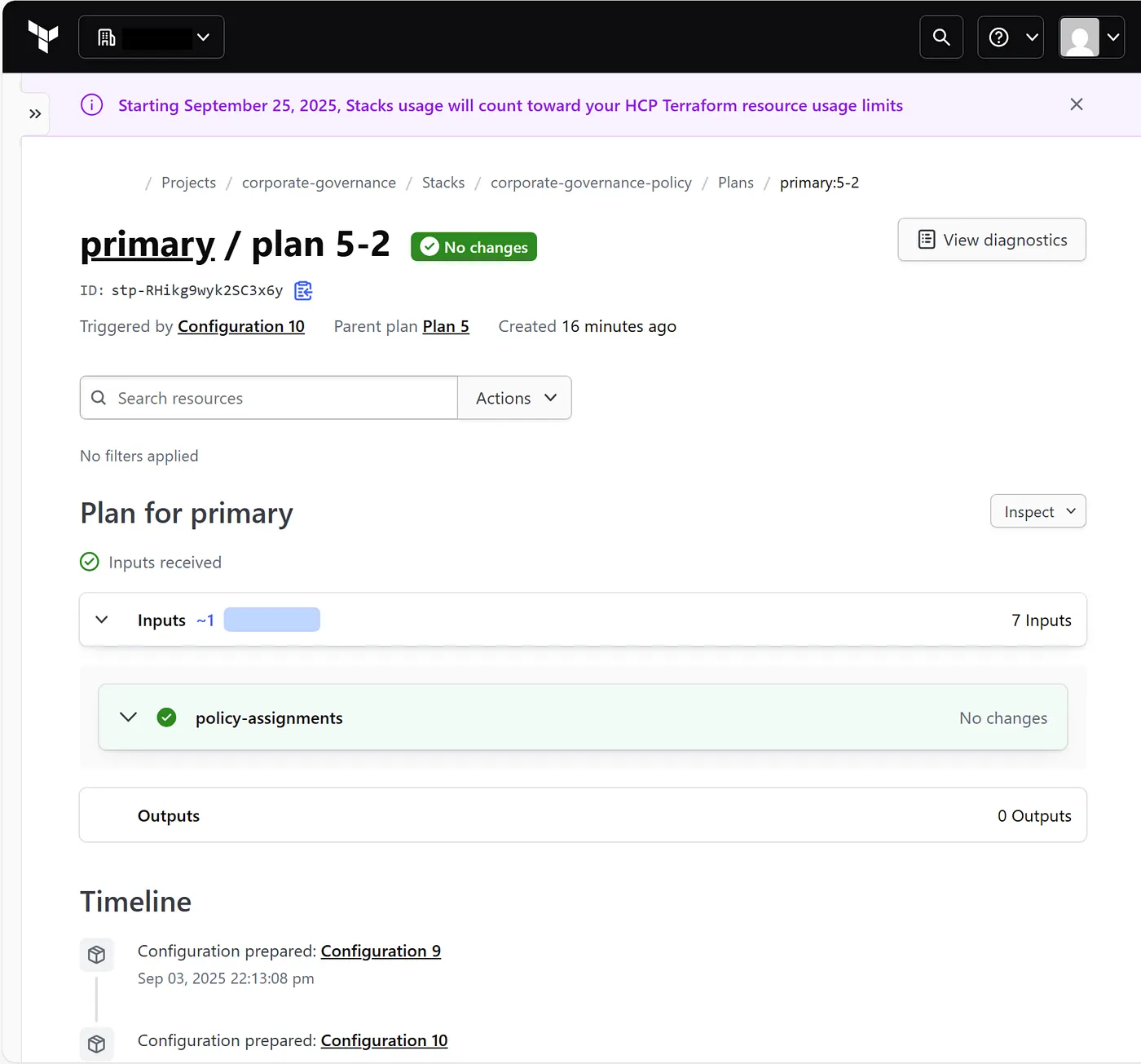
As shown in the HCP Terraform stack output , the policy is successfully assigned to the target subscription.
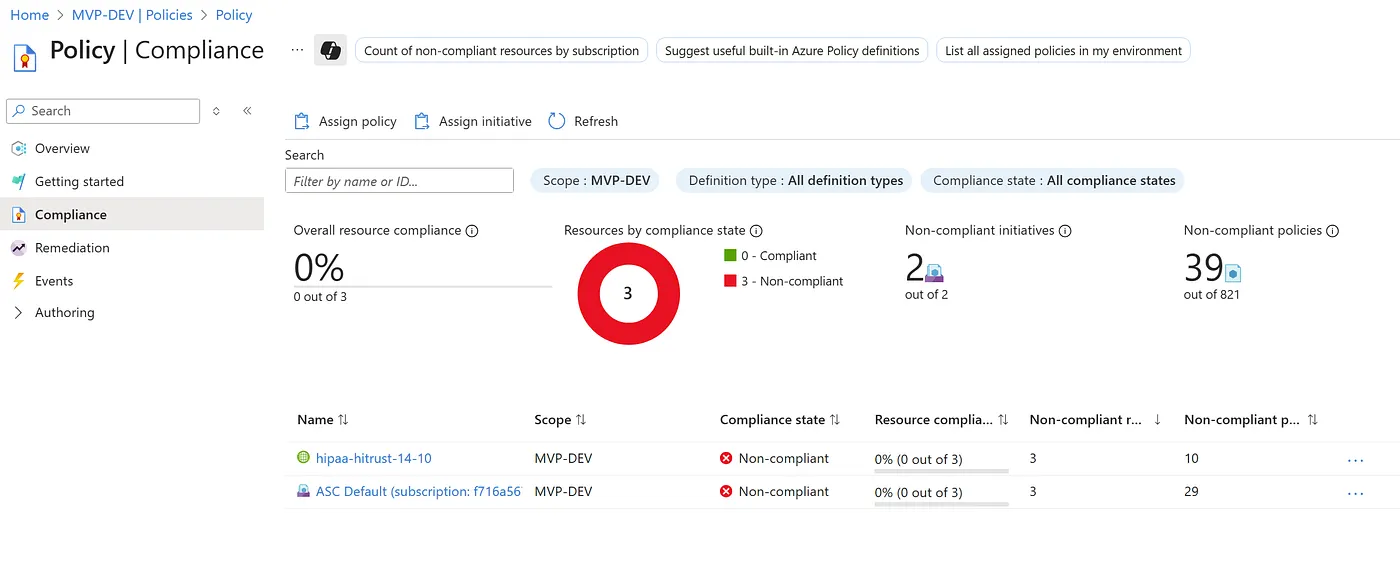
This can also be validated in the Azure Portal under Policy → Assignments, where the HIPAA HITRUST 14.10 initiative shows up under your selected subscription.
Conclusion
Assigning a built-in regulatory policy initiative like HIPAA HITRUST 14.10 in Terraform isn’t overly complicated, but it’s definitely verbose — especially when you’re managing all parameters yourself. But its super important to know what these parameters are doing and what they are configured with. When using Azure Built-in Policy Initiatives this is where most of your configuration will be maintained. In my opinion it’s always better to be explicit so you know what and how you’re policies are configured.
Using the azurerm_subscription_policy_assignment resource with a properly structured locals block gives you full control and visibility into the policy’s configuration.
Hopefully, Microsoft/HashiCorp will streamline the provider resources again someday. Until then, this is the cleanest way I’ve found to apply these initiatives through Terraform — again, I’ll probably improve this over time, perhaps using a module to encapsulate the parameters and make them a little bit more human readable rather than a giant text wall.
If you’re planning to implement this across multiple subscriptions or environments, consider wrapping this logic into a module for easier reuse and consistency.